Understanding iPhone Battery Health and Its Impact
Understanding and optimizing your iPhone’s battery health is essential for maintaining peak performance and extending the battery’s lifespan. A healthy battery ensures your iPhone delivers consistent power, reduces unexpected shutdowns, and minimizes the need for frequent replacements. Broken iPhone screen? Get it fixed at your doorstep in 30 minutes! Here’s a comprehensive guide to help you maintain your iPhone battery’s health and optimize its performance for better iphone battery health optimization:
- Battery Capacity: This indicates the maximum charge your battery can hold. Over time, battery capacity naturally decreases, which can affect your iPhone’s overall performance and battery life.
- Charge Cycles: iPhone batteries, which use lithium ion batteries technology, are designed to endure a specific number of charge cycles. One cycle equals using 100% of your battery’s capacity, but not necessarily all at once.
- Peak Performance Capability: This reflects how well your iPhone can perform tasks as the battery ages. Maintaining this capability helps avoid slowdowns and unexpected shutdowns.
By understanding these factors, you can make informed decisions to preserve your battery power and extend battery life, enhancing your device’s longevity.
Simple Daily Habits to Maximize Your iPhone Battery Life
Incorporating these easy habits into your daily charging routine can help you save battery life and extend the battery’s overall health:
- Adjust Screen Brightness: Reduce screen brightness or enable auto-brightness in your iPhone settings to save power. The brightness slider in Control Center makes this quick and easy.
- Manage Background App Refresh: Turn off background app refresh for specific apps that don’t need constant updates via Settings > General > Background App Refresh. This conserves battery power by preventing unnecessary background activity.
- Enable Low Power Mode: Activate Low Power Mode in Settings > Battery or add low power mode to Control Center to extend battery life when the battery icon shows low percentage. This mode reduces display brightness, minimizes system animations, and limits background activity to conserve battery life.
These habits not only help conserve battery but also improve your iPhone’s battery performance throughout the day, helping you get more battery life from your device.
Advanced Charging Techniques for Long-Lasting Battery Care
Adopting smart charging habits can significantly extend your battery’s lifespan and optimize battery health:
- Avoid Full Charge Cycles: Try to keep your battery level between 20% and 80%. Frequently charging to 100% or letting it drain to 0% can accelerate battery aging.
- Use Optimized Battery Charging: Enable this feature in your settings to slow charging when your battery nears full capacity, reducing excess heat and battery wear.
- Avoid Overnight Charging: Charging your iPhone overnight can generate excess heat, which affects battery capacity over time. Instead, charge during the day and unplug once your battery reaches an optimal level.
Following these charging habits helps maintain your battery’s capacity and ensures better long-term battery health optimization, aligning with your daily charging routine.
Troubleshooting Common Battery Drain Issues on iPhones
If you notice your battery draining faster than usual, try these troubleshooting steps:
- Check Battery Usage: Open Settings > Battery to view which apps consume the most battery power. This helps you determine battery health and identify specific apps that might be affecting battery life.
- Disable Unnecessary Features: Turn off Bluetooth, Wi-Fi, and location services for certain apps when not needed by navigating to Settings > Privacy > Location Services. These features can significantly affect battery life if left active unnecessarily.
- Update iOS: Keep your iPhone updated with the latest iOS version, as updates often include improvements to battery performance and bug fixes that reduce battery drain.
Implementing these steps can help you conserve battery and improve your iPhone’s overall battery health.
Extending the Lifespan of Your iPhone Battery
To further extend your battery’s lifespan and maintain optimal battery performance, follow these additional tips:
- Avoid Extreme Temperatures: Keep your iPhone within the recommended temperature range of 0° to 35° C (32° to 95° F). Exposure to excessive heat or cold can permanently reduce battery capacity.
- Use Certified Chargers: Always charge your iPhone with Apple-certified chargers and cables, including USB C chargers for newer models, to prevent damage and ensure safe, efficient charging.
- Replace Battery When Needed: If your battery health drops below 80%, consider replacing it to restore full performance. Check your battery health in Settings > Battery > Battery Health.
By adhering to these practices, you can conserve battery power and keep your iPhone running efficiently for longer.
Detailed Steps for Battery Maintenance
- Monitor Battery Usage Regularly
Regularly check which apps and services consume the most battery:
- Go to Settings > Battery to view detailed battery usage per app.
- Review usage over the Last 24 Hours and Last 10 Days to spot trends.
- Optimize Settings for Better Battery Life
Adjust these settings to save power without sacrificing functionality:
- Lower screen brightness or enable Auto-Brightness.
- Turn off Wi-Fi and Bluetooth when not in use.
- Restrict location services for certain apps via Settings > Privacy > Location Services.
- Utilize Power Saving Features
Make use of built-in features designed to conserve battery:
- Enable Low Power Mode when battery is low.
- Turn on Optimized Battery Charging to slow battery aging.
- Use Dark Mode to reduce screen brightness and save battery, especially on OLED screens.
- Charge Smartly
Adopt healthy charging habits:
- Avoid leaving your iPhone plugged in after reaching 100%.
- Charge in short bursts rather than letting the battery fully drain before recharging.
- Manage Background Activities
Reduce battery drain from background processes:
- Disable Background App Refresh for non-essential apps.
- Set email fetching to manual or less frequent intervals to fetch data manually.
- Adjust Lock Screen and Widgets
- Limit lock screen widgets and notifications to reduce battery drain from constant updates.
- Manage your home screen to avoid excessive background activity.
Advanced Battery Care Tips
For enhanced battery health optimization, consider these tips:
- Avoid intensive processing tasks like heavy gaming for extended periods to prevent overheating.
- Occasionally calibrate your battery by fully draining and then fully charging it.
- Keep your charging port clean to ensure efficient charging.
- Use Adaptive Power Mode available in newer models to automatically optimize power usage based on your daily charging routine.
Troubleshooting Common Issues
Battery Draining Quickly?
- Restart your iPhone to clear temporary glitches.
- Update apps to their latest versions.
- Reset settings if battery drain persists.
Battery Not Charging?
- Check charging cable and adapter for damage.
- Clean the charging port.
- Try different power sources.
Overheating Issues
- Avoid direct sunlight.
- Remove the phone case if overheating.
- Close apps using heavy processing power.
Extending Your iPhone’s Battery Lifespan
Proper Storage
- Charge to about 50% before long-term storage.
- Store in a cool, dry place.
Battery Replacement
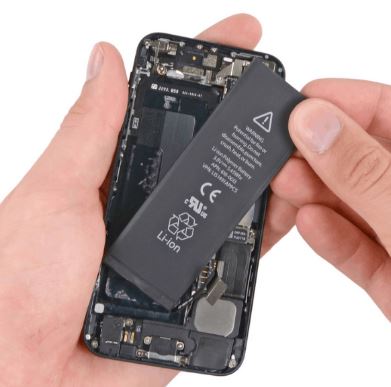
- Replace the battery if health drops below 80% for optimal performance.
Keep Software Updated
- Regularly update iOS for battery management improvements.
Maintaining your iPhone’s battery health involves good daily habits, smart charging practices, and timely troubleshooting. Follow these guidelines to conserve battery power, extend the battery’s lifespan, and ensure reliable performance. For professional repairs, trust iPhone Ambulance for fast, convenient service. Don’t let a faulty iPhone slow you down – book your repair today and get back to full power!
Enjoy peace of mind with our high-quality, on-demand iPhone repair services. Join countless satisfied customers in Brisbane benefiting from fast, reliable iPhone care!
Fill out the form below to book your repair now and let us restore your iPhone to its prime condition.
Related Posts
Mobile Phone Repair Ipswich: Complete Guide to Fast & Reliable Service
Key Takeaways Professional mobile phone repair services available at Riverlink Shopping Centre with 30 minutes to 2 hours turnaround time Competitive pricing ranges from $79 to $539 depending on device [...]
Phone Repair Marsden: Your Trusted Mobile Phone Expert
When it comes to phone repair Marsden residents can rely on, finding a professional service that combines expertise, reliability, and affordability is essential. At iPhone Ambulance, we provide top-notch phone [...]
Mobile Phone Repair Forest Lake: Your Ultimate Guide to Quality Service
If you're searching for reliable mobile phone repair Forest Lake, you've come to the right place. Whether you own an iPhone, Samsung Galaxy, iPad Air, or other smartphones and tablets, [...]